http://www.pcworld.com/article/220580/Google_Face_Search_to_Use_Social_Network_Photos.html
It’s been a little over a week since I cut the cord and asked Facebook to delete my account forever. I have to admit I really do miss it. I miss knowing what my friends are up to without having to put any real effort into finding out. I miss posting about my accomplishment or whining about something that went wrong and getting some support back from people.
I really like that I left though. I feel more honest, like a better representation of who I am and want to be. I mean, it’s a little silly to post links on facebook about how you shouldn’t be on facebook isn’t it?
My primary objection with facebook is a response to the nature of the business deal inherent to joining and using facebook. In return for providing the facebook corporation with your personal information, your whereabouts, your habits, things you like and dislike, who your friends are and a myriad of other information you get to talk to your friends with little or not effort. In reciprocation for your personal information you get to be lazy, a little more connected with people you generally don’t talk to, a little creepier than you want to be (the term ‘facebook stalk’ comes to mind), but generally, in my opinion, a bit lazy in comparison to the manner in which socialization and friendship are generally conducted. I find this tradeoff to be unfair and biased towards the corporation. I value the information I was sharing on facebook the same as I do any personal information. We have federal laws about protecting our medical information, why not the bands we like or our pictures from last weekend? Is one really more valuable or inherently personal than the other? In sum, facebook gets too much in return for what they give me.
This leads me to my second major issue. I think that our economy is not set up to deal with putting a value on a non-consumable good. All the content (data) you generate on facebook can be mined, related to your friends data, and used in very powerful ways to target marketing towards you in an unrelenting effort to make us think less and buy more. I think that people generally do not understand this and therefore undervalue their own information. This is made abundantly clear to me when people give up their online privacy to find out what their ‘Stripper Name’ is, what ‘Sex and the City’ character they are, or whatever other asinine thing some insidious data miner has come up with to get access to you and your friends information. Your data can be collected and resold an infinite number of times to whomever wants to buy it. This commodity is fundamentally different than traditional consumable goods. That fundamental difference is what drives the misunderstanding among the public regarding the value of their personal information and the data you create just by using the service.
There’s a reason facebook is “free and always will be” – it’s that your information is incredibly valuable and they’re getting the long end of the stick.
Today I deleted my facebook account. Forever.
I couldn’t take it anymore. My primary frustration is with the commodification of personal information that is gathered from people who are (in my opinion) unwittingly providing a (soon to be publicly traded) corporation with their commodity as well as exposing themselves to dangers they are completely unaware of.
I think that our society has found itself in the midst of a revolution that it is unknowingly participating in and legally unprotected from. At this point I’m struggling to articulate all the things I’m angry about but it seems the only thing I can do is stop participating. So, I’m out. Apparently, facebook is so appalled that I asked them to delete me that I have 14 days to consider my decision. Perhaps I’ll work on articulating my reasons for leaving and express them here. From this point forward, you can expect to find more posts here.
A few weeks ago I posted about building a mug heater that was controlled by an Arduino reading from some sensor values. In this post I’m going to try and put together my notes and photos from the build project…
One of my first Arduino projects was to use a thermistor to sense the temperature of the warming plate and then change the color of an RGB LED accordingly. The mug warmer project was certainly inspired in part by this initial testing – that and the fact that my coffee always gets too hot and I tend to leave the heater on when I leave the room (which I’m pretty sure is a fire hazard).
Here’s the Mug Heater in its current state, it’s fully operational and has been a nice addition to my desktop, I just haven’t had time to dress the wires properly and make it all look nice.

The project consists of four primary components. The whole thing is controlled by an Arduino Pro (5V/16Mhz). The power to the mug heater is controlled by another Sparkfun product that I really like – the Relay Control Board. Here are two boards mounted in an enclosure I bought at the local Radio Shack when they went out of business:

So I busted out my trusty Dremel tool and cut out a piece of perf board to fit across the enclosure. I had to cut out for access to the control and power supply ports on the relay board as well as to get around the screws that hold it in. I was trying to keep the board as large as possible since I wasn’t really sure how much room I was going to need.

Two sensors, two LEDs, and the power switch are located inside the mug heater housing. Each of these needed to be connected to one of the I/O pins on the Arduino. All wired up the perf board looks something like this:

At this point in the project I hooked everything up and started testing the whole thing out… Which led to this face:


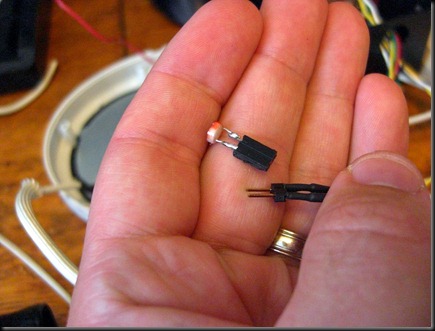
There were several problems… The most concerning was the weird power surge that kept causing my computer reset. I had lots of problems with mounting LEDs and sensors. (Bear in mind this is the first time I’ve ever built something that would be dedicated to one job and actually in an enclosure of some time so all of this was new…) At this point I decided to take most everything I had done apart and start over. I installed LED clips for the LEDs so they wouldn’t just be glued in place. I soldered jumpers to the sensors and the LED pins so I could disconnect those wires more easily. I also got the Dremel out again and cut out a large portion of the bottom and back of the mug-warmer enclosure in order to make the wire management bearable. Some photos:
Jumpers attached to the photocell:
The cutout back so I can see what is going on and have room for all the wires:

I also re-glued the mounts for the Arduino and drilled a third hole in the enclosure so I could plug the FTDI in and upload new programs/get serial data on the computer with the board in the enclosure, this made my life much better!
In the above picture you can also see the nifty power connector I soldered on, because removable wires make me happy.
Here’s your reward for scrolling this far:

Also, the project code:
//Define LED Pin Numbers
int RED_LED = 3;
int GREEN_LED = 5;
int BLUE_LED = 6;
int BRIGHTNESS = 15;
// Define pin number that thermistor will be attached to
int TEMP_PIN = 2;
// Define pin number that the photoresistor will be attached to
int PHOTO_PIN = 0;
// Define pin number for relay trigger
int RELAY = 8;
boolean Relay_State = false;
// Temperature values for cutoffs
int HIGH_TEMP = 170;
int LOW_TEMP = 130;
// I copied this function from the Arduino tutorial on using a thermistor available at www.arduino.cc
// Whomever wrote it, it's fantastic and I thank you!
double Thermistor(int RawADC) {
double Temp;
Temp = log(((10240000/RawADC) - 10000));
Temp = 1 / (0.001129148 + (0.000234125 * Temp) + (0.0000000876741 * Temp * Temp * Temp));
Temp = Temp - 273.15; // Convert Kelvin to Celcius
Temp = (Temp * 9.0)/ 5.0 + 32.0; // Convert Celcius to Fahrenheit
return Temp;
}
double getTemp() // I got sick of typing all this out every time I needed the temperature...
{
return Thermistor(analogRead(TEMP_PIN));
}
boolean MugPresent() { //Function returns a true value if the analogRead of the Photocell is less than 10, which based on my testing is a reasonable threshold...
if (analogRead(PHOTO_PIN) > 10)
{ return false; }
else
{ return true; }
}
void Debug() // I hate typing things twice, this is convienient.
{
Serial.println("DEBUG DATA");
Serial.println(getTemp());
Serial.println(analogRead(PHOTO_PIN));
if (Relay_State == false)
Serial.println("RELAY OFF");
else
Serial.println("RELAY ON");
}
void RelayControl() {
if(getTemp() < LOW_TEMP && Relay_State == false)
{ digitalWrite(RELAY, HIGH); Relay_State = true; }
else if(getTemp() > HIGH_TEMP && Relay_State == true)
{ digitalWrite(RELAY, LOW); Relay_State = false; }
}
void LEDColor() {
if(getTemp() < LOW_TEMP)
{
analogWrite(RED_LED, 0);
analogWrite(GREEN_LED, 0);
analogWrite(BLUE_LED, BRIGHTNESS);
}
else if (getTemp() > LOW_TEMP && getTemp() < HIGH_TEMP)
{
analogWrite(RED_LED, 0);
analogWrite(GREEN_LED, BRIGHTNESS);
analogWrite(BLUE_LED, 0);
}
else if (getTemp() > HIGH_TEMP)
{
analogWrite(RED_LED, BRIGHTNESS);
analogWrite(GREEN_LED, 0);
analogWrite(BLUE_LED, 0);
}
}
void setup(void) {
Serial.begin(9600);
Serial.println("Serial Started");
pinMode(PHOTO_PIN, INPUT);
pinMode(TEMP_PIN, INPUT);
pinMode(RED_LED, OUTPUT);
pinMode(GREEN_LED, OUTPUT);
pinMode(BLUE_LED, OUTPUT);
pinMode(RELAY, OUTPUT);
digitalWrite(RED_LED, LOW);
digitalWrite(GREEN_LED, LOW);
digitalWrite(BLUE_LED, LOW);
digitalWrite(RELAY,LOW);
//9-22-2010 I added this function to make the warming plate warm up once before switching on and off, that way I can turn it on, go get my coffee and come back with a warm plate to set it on.
while(getTemp() < HIGH_TEMP)
{
if (!Relay_State)
{
digitalWrite(RELAY,HIGH); Relay_State = true;
Debug();
}
}
}
void loop() {
LEDColor();
while (MugPresent())
{
RelayControl();
Debug();
LEDColor();
delay(1600);
}
Debug();
digitalWrite(RELAY, LOW); Relay_State = false;
delay(1600);
}
I have a dream. A dream that one day, I will have a mug heater that will not only keep my coffee toasty but regulate its temperature. I have a dream that there will also be a sensor that will turn the heating element off when there is no mug to be heated. I have a dream, I am a geek – that dream is about to come true.
Hey, if Glen Beck can steal words from greater men than himself, so can I…
Here’s a quick video about my newest Arduino project – the Sensor Enabled Mug Heater: